1<h1 align="center">Conversations</h1>
2
3<p align="center">Conversations: the very last word in instant messaging</p>
4
5<p align="center">
6 <a href="https://conversations.im/j/conversations@conference.siacs.eu">
7 <img src="https://inverse.chat/badge.svg?room=conversations@conference.siacs.eu"
8 alt="chat on our conference room">
9 </a>
10 <a href="https://travis-ci.org/siacs/Conversations">
11 <img src="https://travis-ci.org/siacs/Conversations.svg?branch=master"
12 alt="build status">
13 </a>
14 <a href="https://bountysource.com/teams/siacs">
15 <img src="https://api.bountysource.com/badge/tracker?tracker_id=519483" alt="Bountysource">
16 </a>
17</p>
18
19<p align="center">
20 <a href="https://play.google.com/store/apps/details?id=eu.siacs.conversations&referrer=utm_source%3Dgithub">
21 <img src="https://conversations.im/images/en-play-badge.png"
22 alt="Google Play">
23 </a>
24 <a href="http://www.amazon.com/dp/B00WD35AAC/">
25 <img src="https://images-na.ssl-images-amazon.com/images/G/01/AmazonMobileApps/amazon-apps-store-us-black.png"
26 alt="Amazon App Store">
27 </a>
28</p>
29
30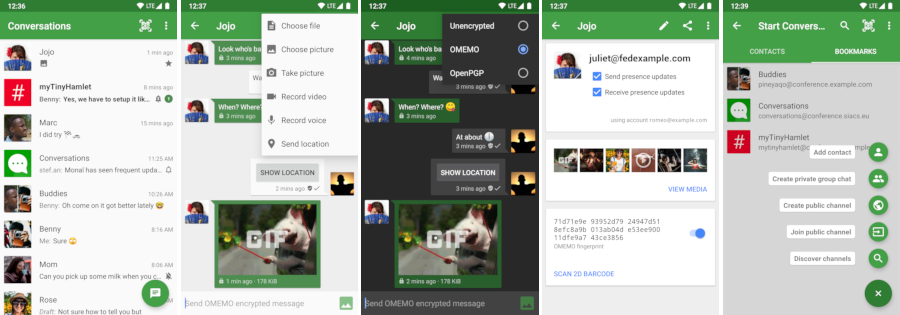
31
32## Design principles
33
34* Be as beautiful and easy to use as possible without sacrificing security or
35 privacy
36* Rely on existing, well established protocols (XMPP)
37* Do not require a Google Account or specifically Google Cloud Messaging (GCM)
38
39## Features
40
41* End-to-end encryption with [OMEMO](http://conversations.im/omemo/) or [OpenPGP](http://openpgp.org/about/)
42* Send and receive images as well as other kind of files
43* Share your location
44* Send voice messages
45* Indication when your contact has read your message
46* Intuitive UI that follows Android Design guidelines
47* Pictures / Avatars for your Contacts
48* Synchronizes with desktop client
49* Conferences (with support for bookmarks)
50* Address book integration
51* Multiple accounts / unified inbox
52* Very low impact on battery life
53
54
55### XMPP Features
56
57Conversations works with every XMPP server out there. However XMPP is an
58extensible protocol. These extensions are standardized as well in so called
59XEP's. Conversations supports a couple of these to make the overall user
60experience better. There is a chance that your current XMPP server does not
61support these extensions; therefore to get the most out of Conversations you
62should consider either switching to an XMPP server that does or — even better —
63run your own XMPP server for you and your friends. These XEP's are:
64
65* [XEP-0065: SOCKS5 Bytestreams](http://xmpp.org/extensions/xep-0065.html) (or mod_proxy65). Will be used to transfer
66 files if both parties are behind a firewall (NAT).
67* [XEP-0163: Personal Eventing Protocol](http://xmpp.org/extensions/xep-0163.html) for avatars and OMEMO.
68* [XEP-0191: Blocking command](http://xmpp.org/extensions/xep-0191.html) lets you blacklist spammers or block contacts
69 without removing them from your roster.
70* [XEP-0198: Stream Management](http://xmpp.org/extensions/xep-0198.html) allows XMPP to survive small network outages and
71 changes of the underlying TCP connection.
72* [XEP-0280: Message Carbons](http://xmpp.org/extensions/xep-0280.html) which automatically syncs the messages you send to
73 your desktop client and thus allows you to switch seamlessly from your mobile
74 client to your desktop client and back within one conversation.
75* [XEP-0237: Roster Versioning](http://xmpp.org/extensions/xep-0237.html) mainly to save bandwidth on poor mobile connections
76* [XEP-0313: Message Archive Management](http://xmpp.org/extensions/xep-0313.html) synchronize message history with the
77 server. Catch up with messages that were sent while Conversations was
78 offline.
79* [XEP-0352: Client State Indication](http://xmpp.org/extensions/xep-0352.html) lets the server know whether or not
80 Conversations is in the background. Allows the server to save bandwidth by
81 withholding unimportant packages.
82* [XEP-0363: HTTP File Upload](http://xmpp.org/extensions/xep-0363.html) allows you to share files in conferences
83 and with offline contacts.
84
85## FAQ
86
87### General
88
89#### How do I install Conversations?
90
91Conversations is entirely open source and licensed under GPLv3. So if you are a
92software developer you can check out the sources from GitHub and use Gradle to
93build your apk file.
94
95The more convenient way — which not only gives you automatic updates but also
96supports the further development of Conversations — is to buy the App in the
97Google [Play Store](https://play.google.com/store/apps/details?id=eu.siacs.conversations&referrer=utm_source%3Dgithub).
98
99Buying the App from the Play Store will also give you access to our [beta test](#beta).
100
101#### I don't have a Google Account but I would still like to make a contribution
102
103I accept donations over PayPal, bank transfer and various crypto currencies. For donations via PayPal you
104can use the email address `donate@siacs.eu` or the button below.
105
106[](https://www.paypal.com/cgi-bin/webscr?cmd=_s-xclick&hosted_button_id=CW3SYT3KG5PDL)
107
108**Disclaimer:** I'm not a huge fan of PayPal and their business policies. For
109larger contributions please get in touch with me beforehand and we can talk
110about bank transfer (SEPA).
111
112##### Crypto currencies
113
114Bitcoin: `1AeqNAcg85APAZj9BZfAjdFCC5zesqXp2B`
115
116Bitcoin Cash: `16ABkXzYAwWz8Y5DcWFfbBRqL63g3hzEaU`
117
118Ether: `0x5c4e5239cd9c6f4a909e4e8361526e2e3c8ba9fa`
119
120#### How do I create an account?
121XMPP, like email, is a federated protocol, which means that there is not one company you can create an *official XMPP account* with. Instead there are hundreds, or even thousands, of providers out there. One of those providers is our very own [conversations.im](https://account.conversations.im). If you don’t like to use *conversations.im* use a web search engine of your choice to find another provider. Or maybe your university has one. Or you can run your own. Or ask a friend to run one. Once you've found one, you can use Conversations to create an account. Just select *register new account* on server within the create account dialog.
122
123##### Domain hosting
124Using your own domain not only gives you a more recognizable Jabber ID, it also gives you the flexibility to migrate your account between different XMPP providers. This is a good compromise between the responsibilities of having to operate your own server and the downsides of being dependent on a single provider.
125
126Learn more about [conversations.im Jabber/XMPP domain hosting](https://account.conversations.im/domain/).
127
128##### Running your own
129If you already have a server somewhere and are willing and able to put the necessary work in, one alternative-in the spirit of federation-is to run your own. We recommend either [Prosody](https://prosody.im/) or [ejabberd](https://www.ejabberd.im/). Both of which have their own strengths. Ejabberd is slightly more mature nowadays but Prosody is arguably easier to set up.
130
131For Prosody you need a couple of so called [community modules](https://modules.prosody.im/) most of which are maintained by the same people that develop Prosody.
132
133If you pick ejabberd make sure you use the latest version. Linux Distributions might bundle some very old versions of it.
134
135#### Where can I set up a custom hostname / port
136Conversations will automatically look up the SRV records for your domain name
137which can point to any hostname port combination. If your server doesn’t provide
138those please contact your admin and have them read
139[this](http://prosody.im/doc/dns#srv_records). If your server operator is unwilling
140to fix this you can enable advanced server settings in the expert settings of
141Conversations.
142
143#### I get 'Incompatible Server'
144
145As regular user you should be picking a different server. The server you selected
146is probably insecure and/or very old.
147
148If you are a server administrator you should make sure that your server provides
149either STARTTLS or [XEP-0368: SRV records for XMPP over TLS](https://xmpp.org/extensions/xep-0368.html).
150
151On rare occasions this error message might also be caused by a server not providing
152a login (SASL) mechanism that Conversations is able to handle. Conversations supports
153SCRAM-SHA1, PLAIN, EXTERNAL (client certs) and DIGEST-MD5.
154
155#### I get 'Bind failure'. What does that mean?
156
157Some Bind failures are transient and resolve themselves after a reconnect.
158
159When trying to connect to OpenFire the bind failure can be a permanent problem when the domain part of the Jabber ID entered in Conversations doesn’t match the domain the OpenFire server feels responsible for. For example OpenFire is configured to use the domain `a.tld` but the Jabber ID entered is `user@b.tld` where `b.tld` also points to the same host. During bind OpenFire tries to reassign the Jabber to `user@a.tld`. Conversations doesn’t like that.
160This can be fixed by creating a new account in Conversations that uses the Jabber ID `user@a.tld`.
161
162Note: This is kind of a weird quirk in OpenFire. Most other servers would just throw a 'Server not responsible for domain' error instead of attempting to reassign the Jabber ID.
163
164Maybe you attempted to use the Jabber ID `test@b.tld` because `a.tld` doesn’t point to the correct host. In that case you might have to enable the extended connection settings in the expert settings of Conversations and set a host name.
165
166### I get 'Stream opening error'. What does that mean?
167
168In most cases this error is caused by ejabberd advertising support for TLSv1.3 but not properly supporting it. This can happen if the openssl version on the server already supports TLSv1.3 but the fast\_tls wrapper library used by ejabberd not (properly) support it. Upgrading fast\_tls and ejabberd or - theoretically - downgrading openssl should fix the issue. A work around is to explicity disable TLSv1.3 support in the ejabberd configuration. More information can be found on [this issue on the ejabberd issue tracker](https://github.com/processone/ejabberd/issues/2614).
169
170
171#### I’m getting this annoying permanent notification
172Starting with Conversations 2.3.6 Conversations releases distributed over the Google Play Store will display a permanent notification if you are running it on Android 8 and above. This is a rule that it is essentially enforced by the Google Play Store (you won’t have the problem if you are getting your app from F-Droid).
173
174However you can disable the notification via settings of the operating system. (Not settings in Conversations.). For that you can long press the permanent notification and disable that particular type of notification by moving the slider to the left. This will make the notification disappear but create another notification (this time created by the operating system itself.) that will complain about Conversations (and other apps) using battery. Starting with Android 8.1 you can disable that notification again with the same method described above.
175
176The battery consumption and the entire behaviour of Conversations will remain the same (as good or as bad as it was before). Why is Google doing this to you? We have no idea.
177
178P.S.: For Android version up to and including 7.1 the foreground notification is still controlled over the expert settings within Conversations as it always has been.
179
180#### How do XEP-0357: Push Notifications work?
181You need to be running the Play Store version of Conversations and your server needs to support push notifications.¹ Because *Google Cloud Notifications (GCM)* are tied with an API key to a specific app your server can not initiate the push message directly. Instead your server will send the push notification to the Conversations App server (operated by us) which then acts as a proxy and initiates the push message for you. The push message sent from our App server through GCM doesn’t contain any personal information. It is just an empty message which will wake up your device and tell Conversations to reconnect to your server. The information sent from your server to our App server depends on the configuration of your server but can be limited to your account name. (In any case the Conversations App server won't redirect any information through GCM even if your server sends this information.)
182
183In summary Google will never get hold of any personal information besides that *something* happened. (Which doesn’t even have to be a message but can be some automated event as well.) We - as the operator of the App server - will just get hold of your account name (without being able to tie this to your specific device).
184
185If you don’t want this simply pick a server which does not offer Push Notifications or build Conversations yourself without support for push notifications. (This is available via a gradle build flavor.) Non-play store source of Conversations like the Amazon App store will also offer a version without push notifications. Conversations will just work as before and maintain its own TCP connection in the background.
186
187 ¹ Your server only needs to support the server side of [XEP-0357: Push Notifications](http://xmpp.org/extensions/xep-0357.html). If you use the Play Store version you do **not** need to run your own app server. The server modules are called *mod_cloud_notify* on Prosody and *mod_push* on ejabberd.
188
189#### Conversations doesn’t work for me. Where can I get help?
190
191You can join our conference room on `conversations@conference.siacs.eu`.
192A lot of people in there are able to answer basic questions about the usage of
193Conversations or can provide you with tips on running your own XMPP server. If
194you found a bug or your app crashes please read the Developer / Report Bugs
195section of this document.
196
197#### I need professional support with Conversations or setting up my server
198
199I'm available for hire. Contact me at `inputmice@siacs.eu`.
200
201#### How does the address book integration work?
202
203The address book integration was designed to protect your privacy. Conversations
204neither uploads contacts from your address book to your server nor fills your
205address book with unnecessary contacts from your online roster. If you manually
206add a Jabber ID to your phones address book Conversations will use the name and
207the profile picture of this contact. To make the process of adding Jabber IDs to
208your address book easier you can click on the profile picture in the contact
209details within Conversations. This will start an "add to address book" intent
210with the JID as the payload. This doesn't require Conversations to have write
211permissions on your address book but also doesn't require you to copy/paste a
212JID from one app to another.
213
214#### I get 'delivery failed' on my messages
215
216If you get delivery failed on images it's probably because the recipient lost
217network connectivity during reception. In that case you can try it again at a
218later time.
219
220For text messages the answer to your question is a little bit more complex.
221When you see 'delivery failed' on text messages, it is always something that is
222being reported by the server. The most common reason for this is that the
223recipient failed to resume a connection. When a client loses connectivity for a
224short time the client usually has a five minute window to pick up that
225connection again. When the client fails to do so because the network
226connectivity is out for longer than that all messages sent to that client will
227be returned to the sender resulting in a delivery failed.
228
229Instead of returning a message to the sender both ejabberd and prosody have the
230ability to store messages in offline storage when the disconnecting client is
231the only client. In prosody this is available via an extra module called
232```mod_smacks_offline```. In ejabberd this is available via some configuration
233settings.
234
235Other less common reasons are that the message you sent didn't meet some
236criteria enforced by the server (too large, too many). Another reason could be
237that the recipient is offline and the server doesn't provide offline storage.
238
239Usually you are able to distinguish between these two groups in the fact that
240the first one happens always after some time and the second one happens almost
241instantly.
242
243#### Where can I see the status of my contacts? How can I set a status or priority?
244
245Statuses are a horrible metric. Setting them manually to a proper value rarely
246works because users are either lazy or just forget about them. Setting them
247automatically does not provide quality results either. Keyboard or mouse
248activity as indicator for example fails when the user is just looking at
249something (reading an article, watching a movie). Furthermore automatic setting
250of status always implies an impact on your privacy (are you sure you want
251everybody in your contact list to know that you have been using your computer at
2524am‽).
253
254In the past status has been used to judge the likelihood of whether or not your
255messages are being read. This is no longer necessary. With Chat Markers
256(XEP-0333, supported by Conversations since 0.4) we have the ability to **know**
257whether or not your messages are being read. Similar things can be said for
258priorities. In the past priorities have been used (by servers, not by clients!)
259to route your messages to one specific client. With carbon messages (XEP-0280,
260supported by Conversations since 0.1) this is no longer necessary. Using
261priorities to route OTR messages isn't practical either because they are not
262changeable on the fly. Metrics like last active client (the client which sent
263the last message) are much better.
264
265Unfortunately these modern replacements for legacy XMPP features are not widely
266adopted. However Conversations should be an instant messenger for the future and
267instead of making Conversations compatible with the past we should work on
268implementing new, improved technologies and getting them into other XMPP clients
269as well.
270
271Making these status and priority optional isn't a solution either because
272Conversations is trying to get rid of old behaviours and set an example for
273other clients.
274
275#### Translations
276Translations are managed on [Transifex](https://www.transifex.com/projects/p/conversations/)
277
278#### How do I backup / move Conversations to a new device?
279On the one hand Conversations supports Message Archive Management to keep a server side history of your messages so when migrating to a new device that device can display your entire history. However that does not work if you enable OMEMO due to its forward secrecy. (Read [The State of Mobile XMPP in 2016](https://gultsch.de/xmpp_2016.html) especially the section on encryption.)
280
281If you migrate to a new device and would still like to keep your history please use a third party backup tool like [oandbackup](https://github.com/jensstein/oandbackup) (needs root access on the device) or ```adb backup``` (no root access needed) from your computer. It is important that you disable (NOT delete) your account before backup and enable it only after a successful restore, otherwise OMEMO might not work afterwards. Also, remember that you can **only** transfer the backup to either the same version of Android or to a newer one (eg. 5.1.1 -> 5.1.1 or 5.1.1 -> 6.0.1).
282
283#### Conversations is missing a certain feature
284
285I'm open for new feature suggestions. You can use the [issue tracker][issues] on
286GitHub. Please take some time to browse through the issues to see if someone
287else already suggested it. Be assured that I read each and every ticket. If I
288like it I will leave it open until it's implemented. If I don't like it I will
289close it (usually with a short comment). If I don't comment on an feature
290request that's probably a good sign because this means I agree with you.
291Commenting with +1 on either open or closed issues won't change my mind, nor
292will it accelerate the development.
293
294#### You closed my feature request but I want it really really badly
295
296Just write it yourself and send me a pull request. If I like it I will happily
297merge it if I don't at least you and like minded people get to enjoy it.
298
299#### I need a feature and I need it now!
300
301I am available for hire. Contact me via XMPP: `inputmice@siacs.eu`
302
303### Security
304
305#### Why are there two end-to-end encryption methods and which one should I choose?
306
307* OMEMO works even when a contact is offline, and works with multiple devices. It also allows asynchronous file-transfer when the server has [HTTP File Upload](http://xmpp.org/extensions/xep-0363.html). However, OMEMO not widely support and is currently implemented only [by a handful of clients](https://omemo.top).
308* OpenPGP (XEP-0027) is a very old encryption method that has some advantages over OMEMO but should only be used by people who know what they are doing.
309
310#### How do I use OpenPGP
311
312Before you continue reading you should note that the OpenPGP support in
313Conversations is experimental. This is not because it will make the app unstable
314but because the fundamental concepts of PGP aren't ready for widespread use.
315The way PGP works is that you trust Key IDs instead of JID's or email addresses.
316So in theory your contact list should consist of Public-Key-IDs instead of
317JID's. But of course no email or XMPP client out there implements these
318concepts. Plus PGP in the context of instant messaging has a couple of
319downsides: It is vulnerable to replay attacks and it is rather verbose.
320
321To use OpenPGP you have to install the open source app
322[OpenKeychain](http://www.openkeychain.org) and then long press on the account in
323manage accounts and choose renew PGP announcement from the contextual menu.
324
325#### OMEMO is grayed out. What do I do?
326OMEMO has two requirements: Your server and the server of your contact need to support PEP. Both of you can verify that individually by opening your account details and selecting ```Server info``` from the menu. The appearing table should list PEP as available. The second requirement is mutual presence subscription. You can verify that by opening the contact details and see if both check boxes *Send presence updates* and *Receive presence updates* are checked.
327
328#### How does the encryption for conferences work?
329
330For conferences only OMEMO and OpenPGP are supported as encryption method..
331
332##### OMEMO
333
334OMEMO encryption works only in private (members only) conferences that are non-anonymous.
335
336The server of all participants need to pass the OMEMO [Compliance Test](https://conversations.im/compliance/).
337In other words they either need to run version 18.01+ of ejabberd or have the `omemo_all_access` module installed on Prosody.
338
339The owner of a conference can make a public conference private by going into the conference
340details and hit the settings button (the one with the gears) and select both *private* and
341*members only*.
342
343If OMEMO is grayed out long pressing the lock icon will reveal some quick hints on why OMEMO
344is disabled.
345
346##### OpenPGP
347
348Every participant has to announce their OpenPGP key (see answer above).
349If you would like to send encrypted messages to a conference you have to make
350sure that you have every participant's public key in your OpenKeychain.
351Right now there is no check in Conversations to ensure that.
352You have to take care of that yourself. Go to the conference details and
353touch every key id (The hexadecimal number below a contact). This will send you
354to OpenKeychain which will assist you on adding the key. This works best in
355very small conferences with contacts you are already using OpenPGP with. This
356feature is regarded experimental. Conversations is the only client that uses
357XEP-0027 with conferences. (The XEP neither specifically allows nor disallows
358this.)
359
360#### What is Blind Trust Before Verification / why are messages marked with a red lock?
361
362Read more about the concept on https://gultsch.de/trust.html
363
364### What clients do I use on other platforms
365There are XMPP Clients available for all major platforms.
366#### Windows / Linux
367For your desktop computer we recommend that you use [Gajim](https://gajim.org). You need to install the plugins `OMEMO`, `HTTP Upload` and `URL image preview` to get the best compatibility with Conversations. Plugins can be installed from within the app.
368#### iOS
369Unfortunately we don‘t have a recommendation for iPhones right now. There are two clients available [ChatSecure](https://chatsecure.org/) and [Monal](https://monal.im/). Both with their own pros and cons.
370
371
372### Development
373
374<a name="beta"></a>
375#### Beta testing
376If you bought the App on [Google Play](https://play.google.com/store/apps/details?id=eu.siacs.conversations)
377you can get access to the the latest beta version by signing up using [this link](https://play.google.com/apps/testing/eu.siacs.conversations).
378
379#### How do I build Conversations
380
381Make sure to have ANDROID_HOME point to your Android SDK. Use the Android SDK Manager to install missing dependencies.
382
383 git clone https://github.com/siacs/Conversations.git
384 cd Conversations
385 ./gradlew assembleConversationsFreeSystemDebug
386
387There are two build flavors available. *free* and *playstore*. Unless you know what you are doing you only need *free*.
388
389
390[](https://travis-ci.org/siacs/Conversations)
391
392#### How do I update/add external libraries?
393
394If the library you want to update is in Maven Central or JCenter (or has its own
395Maven repo), add it or update its version in `build.gradle`. If the library is
396in the `libs/` directory, you can update it using a subtree merge by doing the
397following (using `minidns` as an example):
398
399 git remote add minidns https://github.com/rtreffer/minidns.git
400 git fetch minidns
401 git merge -s subtree minidns master
402
403To add a new dependency to the `libs/` directory (replacing "name", "branch" and
404"url" as necessary):
405
406 git remote add name url
407 git merge -s ours --no-commit name/branch
408 git read-tree --prefix=libs/name -u name/branch
409 git commit -m "Subtree merged in name"
410
411#### How do I debug Conversations
412
413If something goes wrong Conversations usually exposes very little information in
414the UI (other than the fact that something didn't work). However with adb
415(android debug bridge) you can squeeze some more information out of Conversations.
416These information are especially useful if you are experiencing trouble with
417your connection or with file transfer.
418
419To use adb you have to connect your mobile phone to your computer with an USB cable
420and install `adb`. Most Linux systems have prebuilt packages for that tool. On
421Debian/Ubuntu for example it is called `android-tools-adb`.
422
423Furthermore you might have to enable 'USB debugging' in the Developer options of your
424phone. After that you can just execute the following on your computer:
425
426 adb -d logcat -v time -s conversations
427
428If need be there are also some Apps on the PlayStore that can be used to show the logcat
429directly on your rooted phone. (Search for logcat). However in regards to further processing
430(for example to create an issue here on Github) it is more convenient to just use your PC.
431
432#### I found a bug
433
434Please report it to our [issue tracker][issues]. If your app crashes please
435provide a stack trace. If you are experiencing misbehavior please provide
436detailed steps to reproduce. Always mention whether you are running the latest
437Play Store version or the current HEAD. If you are having problems connecting to
438your XMPP server your file transfer doesn’t work as expected please always
439include a logcat debug output with your issue (see above).
440
441[issues]: https://github.com/siacs/Conversations/issues