1#Conversations
2Conversations is an open source XMPP (formerly known as Jabber) client for
3Android 4.0+ smart phones.
4[](https://play.google.com/store/apps/details?id=eu.siacs.conversations)
5
6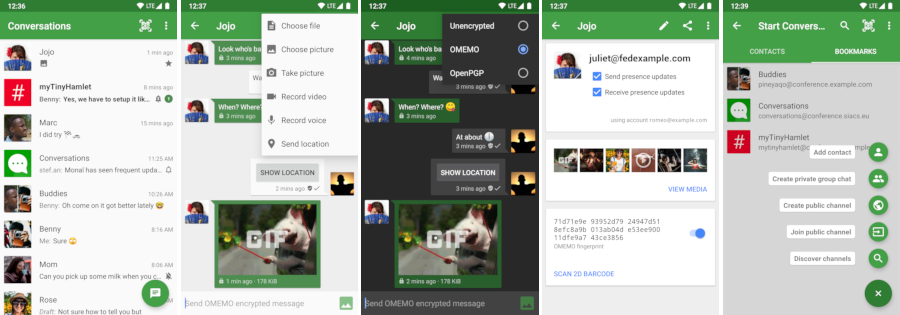
7
8##Design principles
9* Be as beautiful and easy to use as possible without sacrificing security or
10 privacy
11* Rely on existing, well established protocols
12* Do not require a Google Account or specifically Google Cloud Messaging (GCM)
13* Require as little permissons as possible
14
15##Features
16* End-to-end encryption with either OTR or openPGP
17* Sending and receiving images
18* Holo UI
19* Syncs with your desktop client
20* Group Chats
21* Address book integration
22* Multiple Accounts / unified inbox
23
24###XMPP Features
25Conversations works with every XMPP server out there. However XMPP is an extensible
26protocol. These extensions are standardized as well in so called XEP’s.
27Conversations supports a couple of those to make the overall userexperience better. There is a
28chance that your current XMPP server does not support these extensions.
29Therefore to get the most out of Conversations you should consider either switching to an
30XMPP server that does or - even better - run your own XMPP server for you and
31your friends.
32These XEPs are - as of now:
33* XEP-0065: SOCKS5 Bytestreams - or rather mod_proxy65. Will be used to tranfer files if both parties are behind a firewall (NAT).
34* XEP-0138: Stream Compression saves bandwith
35* XEP-0198: Stream Management allows XMPP to surive small network outages and changes of the underlying TCP connection.
36* XEP-0280: Message Carbons which automatically syncs the messages you send to
37 your desktop client and thus allows you to switch seamlessly from your mobile
38 client to your desktop client and back within one conversation.
39* XEP-0237: Roster Versioning mainly to save bandwith on poor mobile connections
40
41##Contributors
42(In order of appearance)
43
44###Code
45* [Rene Treffer](https://github.com/rtreffer)
46* [Andreas Straub](https://github.com/strb)
47* [Alethea Butler](https://github.com/alethea)
48
49###Translations
50* [Sergio Cárdenas](https://github.com/kruks23) (Spanish)
51* [Benoit Bouvarel](https://github.com/BenoitBouvarel) (French)
52* [Daniel Gultsch](https://github.com/iNPUTmice) (German)
53* [Aitor Beriain](https://github.com/beriain) (Basque)
54
55##FAQ
56###General
57####How do I install Conversations?
58Conversations is entirely open source and licensed under GPLv3. So if you are a
59software developer you can check out the sources from github and use ant to
60build your apk file.
61
62The more convenient way - which not only gives you automatic updates but also
63supports the further development of Conversations - is to buy the App in the Google
64[Play Store](https://play.google.com/store/apps/details?id=eu.siacs.conversations).
65
66
67####How do I create an account?
68XMPP like email for example is a federated protocol which means that there is
69not one company you can create your 'official xmpp account' with but there are
70hundreds or even thousands of provider out there. To find one use a web search
71engine of your choice. Or maybe your univeristy has one. Or you can run your own.
72Or ask a friend to run one. Once you found one you can use Conversations to
73create an account. Just select 'register new account on server' within the
74create account dialog.
75####How does the address book integration work?
76The address bock integration was designed to protect your privacy. Conversations
77neither uploads contacts from your address book to your server nor fills your
78address book with unnecessary contacts from your online roster. If you manually
79add a Jabber ID to your phones address book Conversations will use the name and
80the profile picture of this contact. To make the process of adding Jabber IDs to
81your address book easier you can click on the profile picture in the contact
82detais within Conversations. This will start an add to address book intent with the jabber ID
83as payload. This doesn’t require Conversations to have write permissions on your
84address book but also doesn’t require you to copy past Jabber ID from one app to
85another.
86####How can I change my status
87You can set an account offline by long pressing on it and select temporarily
88disable account from the context menu. Other statuses like away, DND and N/A are
89not supported for simplicity reasons. Users tend to forget their status, other
90users ignore them and setting the status automatically would mean too much of an
91impact on privacy.
92###Security
93####Why are there two end-to-end encryption methods and which one should I choose?
94In most cases OTR should be the encryption method of choice. It works out of the box with most contacts as long as they are online.
95However PGP can be in some cases (carbonated messages to multiple clients) be
96more flexible.
97####How do I use openPGP
98Before you continue reading you should notice that the openPGP support in
99Conversations is marked as experimental. This is not because it will make the app
100unstable but because the fundamental concepts of PGP aren't ready for a
101widespread use. The way PGP works is that you trust Key IDs instead of XMPP- or email addresses. So in theory your contact list should consist of Public-Key-IDs instead of email addresses. But of course no email or xmpp client out there implements these concepts. Plus PGP in the context of instant messaging has a couple of downsides. It is vulnerable to replay attacks, it is rather verbose, and decryping and encrypting takes longer than OTR. It is however asynchronous and works well with carbonated messages.
102
103To use openpgp you have to install the opensource app OpenKeychain (www.openkeychain.org) and then long press on the account in manage accounts and choose renew PGP announcement from the contextual menu.
104####How does the encryption for conferences work?
105For conferences the only supported encryption method is OpenPGP. (OTR does not
106work with multiple participents.) Every participant has to announce their
107OpenPGP key. (See answer above). If you would like to send encrypted messages to
108a conference you have to make sure that you have every participants public key
109in your OpenKeychain. Right now there is no check in Conversations to ensure
110that. You have to take care of that yourself. Go to the conference details and
111touch every key id (The hexadecimal number below a contact). This will send you
112to OpenKeychain which will assist you on adding the key.
113This works best in very small conferences with contacts you are already using
114OpenPGP with. This feature is regarded experimental. Conversations is the only
115client that uses XEP-0027 with confercenes. (The XEP neither specifically allows
116nor disallows this.)
117###Development
118####How do I build Conversations
119Make sure to have ANDROID_HOME point to your Android SDK
120```
121git clone https://github.com/siacs/Conversations.git
122cd Conversations
123git submodule update --init --recursive
124ant clean
125ant debug
126```