
When using an 80-column terminal, the output of git bug ls wraps around. (termui works fine, thanks.)
When using an 80-column terminal, the output of git bug ls wraps around. (termui works fine, thanks.)

Hi @jech,
whats your expected behavior? Instead of wrapping around, would you rather like the text to be printed as is?
I'd like a more compact format that fits in 80 columns. There could be a -l flag for those who prefer the long format.
I just got an idea, how this could be solved. I'll do some research and give it a try.
I hacked something together.
 The image shows 3 command outputs:
git-bug ls output.git-bug ls output.Note that the compact output, doesn't truncate the title with an ellipsis. So the title can still wrap when being to long. How do you like it? @jech
I'm not a big fan, since it uses up two lines per issue. I'd like a format similar to the current format, but more compact — less characters for the title, a more compact representation of the username, and no speech bubble icon in the right margin.
I also think that the compact format should be the default, with a -l option for the extended format.
Hi @jech,
I trimmed the whitespace to the bare minimum of 1 space and I removed the comment counter. Further I set the maximal displayed title length to 25 characters and the maximum number of labels to 4 ◼. The status flags could be shortened to 1 character o/c or some graphical icon (not exactly sure which one). Also I'm not sure if I should add a character limit to the displayed username.
Here is an image with following content:
ls displayed output.ls displayed output.ls -f plain output. In case you don't know about this option. :-)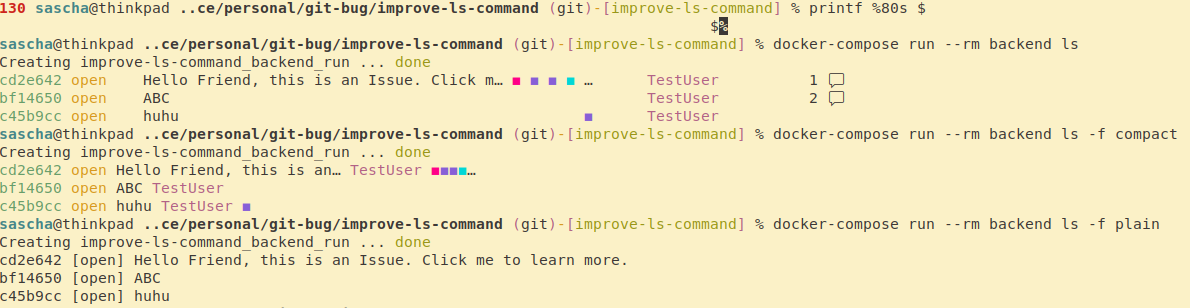
How do you like it?
PS: Regarding the -l flag. Using the -l as flag isn't possible with the current ls implementation, as -l is the flag to filter by labels. But the compact version could become the default one and the current default could be moved to something like -f tabular. But such a change has to be acknowledged by @MichaelMure.
This looks good. Suggestion, align the username as in the default format, but so it fits in 79 columns.
Okey, the user name is aligned. The 79 column should never be reached. (max 7 chars for hash + 1 Space + max 5 chars Status + max 40 chars title + 1 Space + max 5 chars to display a label + 1 Space + max 15 chars for username = 75 chars.)
 Image description:
If this is fine, I will start a PR.
Looks very good to me, thanks a lot. I would like to most humbly request that this format should be the default, it is compact and informative.

I would like to most humbly request that this format should be the default, it is compact and informative.
The best default would be to check the current terminal size and auto-select the one that fits best.
