If iI did not miss anything, the Web-UI is currently read-only.
To be ablle to create bugs, comments, edit, remove and so on in a way that works for any kind of (non-technical) users, is very important for any project that might has such users.
That's correct, the web UI is only read only for now, just because no one took care of that yet. It's an important task, not only for local rich editing (images, files ...), but also to eventually create a public portal which will accept external users.
Note that most of the GraphQL mutations already exist, so that's almost purely an JS/web job.
Michael Muré (MichaelMure)
added label
enhancement
Michael Muré (MichaelMure)
added label
area/ui/web
hoijui (hoijui) commented (edited)
I am not a web dev, and .. generally have little to no idea about the technologies you used in the web UI.
Can you recommend an IDE, editor, tutorial or something to get started?
Michael Muré (MichaelMure) commented
There is plenty of tutorial floating around if you search for react graphql apollo. I don't have anything specific to recommend. But I'm not gonna lie, that's a lot to ingest.
As @MichaelMure mentioned, I created an add-bug screen. It seems to work but I think there is something I need to do in order to "update the apollo cache". I have no idea what that means but I read it in one of the tutorials I was following. The result is that the bug-list is out of date when you go back it it. I just hit refresh for now. I filed a bug to fix it :wink:.
In any case, I'm just tinkering around so if someone else wants to dedicate some real time to this please don't think I've claimed it or anything. I doubt I'll have much time to dedicate to it but I'd love to dig in a little more if I can.
@hoijui I also am a complete n00b to react, graphql, and even JSX but I found it pretty easy to get started (I have some javascript experience though). The instructions at webui/Readme.md worked just fine and I just used a plain editor (vscode) to make my change. Feel free to take a look at my branch and diff it against the upstream to see how I implemented the feature.
hoijui (hoijui) commented (edited)
cool!
thank you @cheshirekow ! will do next time I get the courage for it.
Michael Muré (MichaelMure) commented
This is actively worked on by @sandhose and @ludovicm67 :tada:
Cláudio Silva (claudioantonio) commented
Hi @MichaelMure , @cheshirekow and @hoijui .
Any news about this feature? I'm interested to help. ;-)
Michael Muré (MichaelMure) commented
@claudioantonio no one is working on this at the moment, so feel free to take a stab at it! Much appreciated.
Cláudio Silva (claudioantonio) commented
Ok @MichaelMure . I'll take a look at the work started by @cheshirekow .
Cláudio Silva (claudioantonio) commented
@MichaelMure to start the backend is cygwin sufficient to exec the makefile?
Michael Muré (MichaelMure) commented
@claudioantonio as you likely won't change the graphQL API, you can use your regular git-bug binary. No need for cygwin or anything, just the classic web dev tools like npm.
There is a dedicated Readme to explain the process (again, you don't even have to compile git-bug yourself here): https://github.com/MichaelMure/git-bug/blob/master/webui/Readme.md
Michael Muré (MichaelMure) commented
As you will see, adding a comment already works, but there is plenty of features missing compared to the CLI. Pick what itch you the most ;)
Cláudio Silva (claudioantonio) commented (edited)
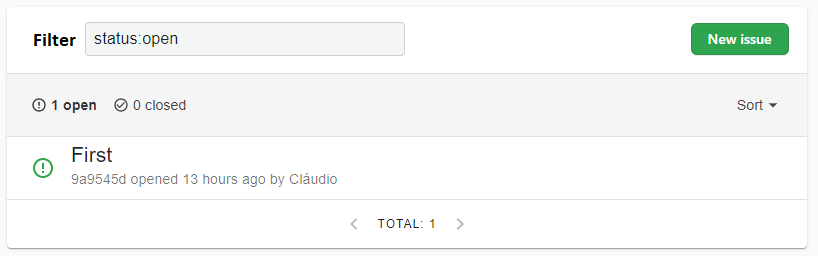
@MichaelMure Does the image below represent a good enough solution?
The changes will be:
Filter label added - left aligned
Filter input text aligned to the left
Green "New issue" button added aligned to the right like github UI for issues feature
Michael Muré (MichaelMure) commented
That's neat :)
Cláudio Silva (claudioantonio) commented (edited)
Hi @MichaelMure !
I read about GraphQL and I did the Apollo tutorial. I had no previous experience with GraphQL before.
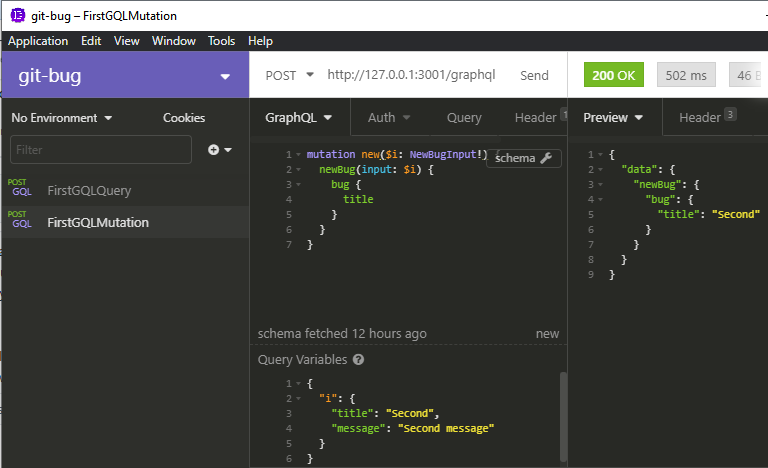
I´m already able to create new bugs through the git-bug API using Insomnia (an app like Postman). See image below.
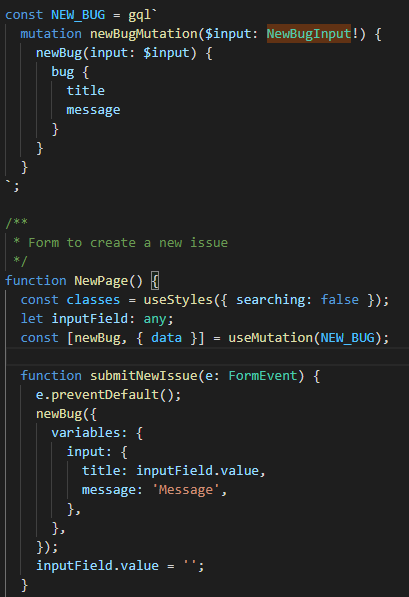
However, I´m having problems to execute the same GraphQL mutation command by React/Apollo. The code should be simple. I will print what I´m doing and I will be glad If You or any other collaborator can give me any hint, ok?
Michael Muré (MichaelMure) commented
Sure, but react is not really my area of expertise.
If that helps, git-bug also has a built-in GraphQL playground when you start the webui: http://127.0.0.1:44159/playground
Cláudio Silva (claudioantonio) commented
Hi @MichaelMure !
Wow! I liked the playground a lot. ;-)
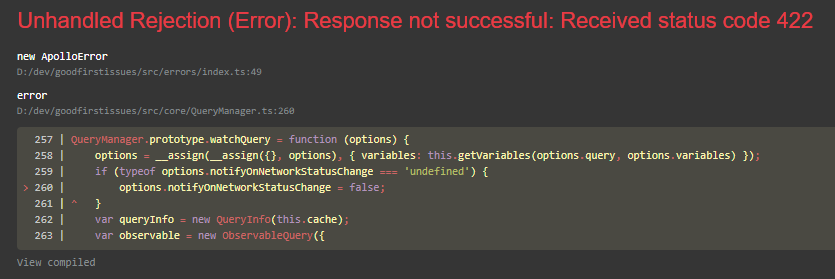
Sorry for the lack of the error message in the last comment.
Michael Muré (MichaelMure) commented
That looks like a HTTP error, maybe looking at the network debugger in your browser would help?
Cláudio Silva (claudioantonio) commented
Problem solved @MichaelMure !
It was a little bit frustrating that a code generator make it work automagically adding just one file but...
c'est la vie.. 😃 Probably was something related to return object type conversion.
I will improve the Readme file with the lessons learned during this issue to give quick context for graphql begginer´s, like me.
Can You edit this issue title to "WebUI - Allow to create bugs"?
I would like to create a new issue specifically for edition as "WebUI - Allow to change a bug title". Today It is already possible to add comments for existing issues. 😉
Michael Muré (MichaelMure) changed the title from WebUI - allow to create bugs to WebUI - allow to create bugs
Michael Muré (MichaelMure) commented
Done. Feel free to open more issues for the other parts (or straight up a PR :-D)
Cláudio Silva (claudioantonio) commented (edited)
@MichaelMure what considerations about permissions should I consider?
Who can create or edit a bug?
I found a component that checks if the user is logged in to decide if comments can be added or not. About what kind of login are We talking about? 🤔
Michael Muré (MichaelMure) commented
@claudioantonio sorry I missed that one.
At the moment, anyone can create and edit any bugs (including comments they are not the author of). This should change in the future once the identity system become smarter. For now, maybe it's best to match whatever is possible in git-bug core?
Regarding the authentication, there is three different scenario:
the user might might not have an identity yet (that is, Repository.userIdentitycan be nil in GraphQL). In that case we want to have a read-only UI if we don't have a user yet.
in the future, the webUI might be used for a public portal (possibly with external auth like github OAuth where identities would be imported in git-bug at first login). Again, we want a read-only view when we don't have a user logged in yet.
the webUI can be started with --read-only to force a read-only view.
Michael Muré (MichaelMure) commented
So in the react code, the write-enabled part of the UI are guarded with the IfLoggedIn component.
Cláudio Silva (claudioantonio) commented
@MichaelMure I think this issue can be closed. ;-)
Cláudio Silva (claudioantonio) commented
@MichaelMure I will create a issue to handle specifically this permission question. ;-)

 Michael Muré (MichaelMure) commented
  Amine (a-hilaly)
added label
Amine (a-hilaly)
added label
 cheshirekow (cheshirekow) commented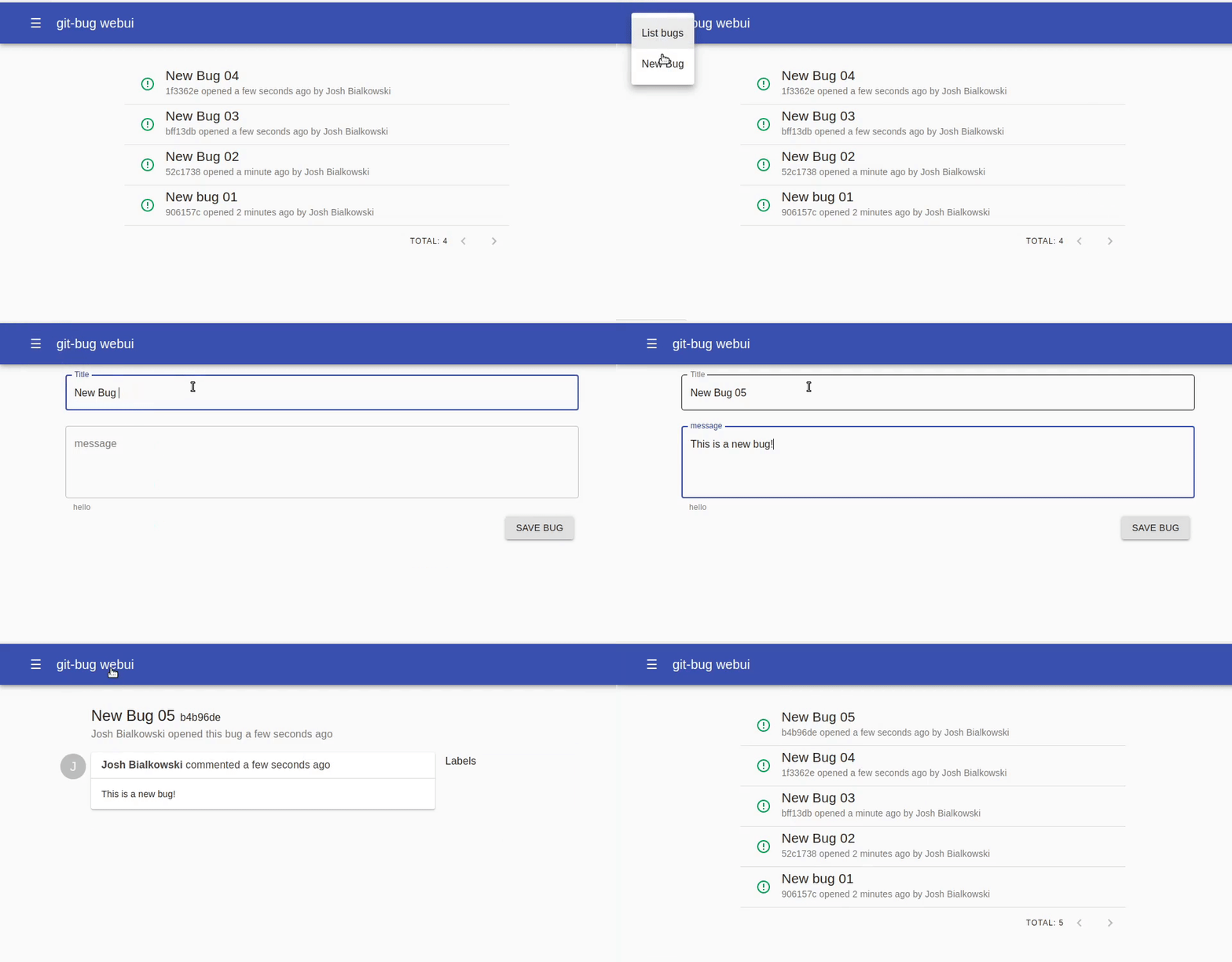
 Cláudio Silva (claudioantonio) commented