1# External Agents
2
3Zed supports many external agents, including CLI-based ones, through the [Agent Client Protocol (ACP)](https://agentclientprotocol.com).
4
5Zed supports [Gemini CLI](https://github.com/google-gemini/gemini-cli) (the reference ACP implementation), [Claude Code](https://www.anthropic.com/claude-code), [Codex](https://developers.openai.com/codex), [GitHub Copilot](https://github.com/github/copilot-language-server-release), and [additional agents](#add-more-agents) you can configure.
6
7> Note that Zed's interaction with external agents is strictly UI-based; the billing, legal, and terms arrangement is directly between you and the agent provider.
8> Zed does not charge for use of external agents, and our [zero-data retention agreements/privacy guarantees](./ai-improvement.md) are **_only_** applicable for Zed's hosted models.
9
10## Gemini CLI {#gemini-cli}
11
12Zed provides the ability to run [Gemini CLI](https://github.com/google-gemini/gemini-cli) directly in the [agent panel](./agent-panel.md).
13Under the hood we run Gemini CLI in the background, and talk to it over ACP.
14
15### Getting Started
16
17First open the agent panel with {#kb agent::ToggleFocus}, and then use the `+` button in the top right to start a new Gemini CLI thread.
18
19If you'd like to bind this to a keyboard shortcut, you can do so by editing your `keymap.json` file via the `zed: open keymap file` command to include:
20
21```json [keymap]
22[
23 {
24 "bindings": {
25 "cmd-alt-g": ["agent::NewExternalAgentThread", { "agent": "gemini" }]
26 }
27 }
28]
29```
30
31#### Installation
32
33The first time you create a Gemini CLI thread, Zed will install [@google/gemini-cli](https://github.com/google-gemini/gemini-cli).
34This installation is only available to Zed and is kept up to date as you use the agent.
35
36By default, Zed will use this managed version of Gemini CLI even if you have it installed globally.
37However, you can configure it to use a version in your `PATH` by adding this to your settings:
38
39```json [settings]
40{
41 "agent_servers": {
42 "gemini": {
43 "ignore_system_version": false
44 }
45 }
46}
47```
48
49#### Authentication
50
51After you have Gemini CLI running, you'll be prompted to choose your authentication method.
52
53Most users should click the "Log in with Google".
54This will cause a browser window to pop-up and auth directly with Gemini CLI.
55Zed does not see your OAuth or access tokens in this case.
56
57You can also use the "Gemini API Key".
58If you select this, and have the `GEMINI_API_KEY` set, then we will use that.
59Otherwise Zed will prompt you for an API key which will be stored securely in your keychain, and used to start Gemini CLI from within Zed.
60
61The "Vertex AI" option is for those who are using [Vertex AI](https://cloud.google.com/vertex-ai), and have already configured their environment correctly.
62
63For more information, see the [Gemini CLI docs](https://github.com/google-gemini/gemini-cli/blob/main/docs/index.md).
64
65### Usage
66
67Gemini CLI supports the same workflows as Zed's first-party agent: code generation, refactoring, debugging, and Q&A. Add context by @-mentioning files, recent threads, or symbols.
68
69> Some agent panel features are not yet available with Gemini CLI: editing past messages, resuming threads from history, and checkpointing.
70
71## Claude Code
72
73Similar to Gemini CLI, you can also run [Claude Code](https://www.anthropic.com/claude-code) directly via Zed's [agent panel](./agent-panel.md).
74Under the hood, Zed runs Claude Code and communicate to it over ACP, through [a dedicated adapter](https://github.com/zed-industries/claude-code-acp).
75
76### Getting Started
77
78Open the agent panel with {#kb agent::ToggleFocus}, and then use the `+` button in the top right to start a new Claude Code thread.
79
80If you'd like to bind this to a keyboard shortcut, you can do so by editing your `keymap.json` file via the `zed: open keymap file` command to include:
81
82```json [keymap]
83[
84 {
85 "bindings": {
86 "cmd-alt-c": ["agent::NewExternalAgentThread", { "agent": "claude_code" }]
87 }
88 }
89]
90```
91
92### Authentication
93
94As of version `0.202.7`, authentication to Zed's Claude Code installation is decoupled entirely from Zed's agent.
95That is to say, an Anthropic API key added via the [Zed Agent's settings](./llm-providers.md#anthropic) will _not_ be utilized by Claude Code for authentication and billing.
96
97To ensure you're using your billing method of choice, [open a new Claude Code thread](./agent-panel.md#new-thread).
98Then, run `/login`, and authenticate either via API key, or via `Log in with Claude Code` to use a Claude Pro/Max subscription.
99
100#### Installation
101
102The first time you create a Claude Code thread, Zed will install [@zed-industries/claude-code-acp](https://github.com/zed-industries/claude-code-acp).
103This installation is only available to Zed and is kept up to date as you use the agent.
104
105Zed will always use this managed version of the Claude Code adapter, which includes a vendored version of the Claude Code CLI, even if you have it installed globally.
106
107If you want to override the executable used by the adapter, you can set the `CLAUDE_CODE_EXECUTABLE` environment variable in your settings to the path of your preferred executable.
108
109```json
110{
111 "agent_servers": {
112 "claude": {
113 "env": {
114 "CLAUDE_CODE_EXECUTABLE": "/path/to/alternate-claude-code-executable"
115 }
116 }
117 }
118}
119```
120
121### Usage
122
123Claude Code supports the same workflows as Zed's first-party agent. Add context by @-mentioning files, recent threads, diagnostics, or symbols.
124
125In complement to talking to it [over ACP](https://agentclientprotocol.com), Zed relies on the [Claude Code SDK](https://docs.anthropic.com/en/docs/claude-code/sdk/sdk-overview) to support some of its specific features.
126However, the SDK doesn't yet expose everything needed to fully support all of them:
127
128- Slash Commands: A subset of [built-in commands](https://docs.anthropic.com/en/docs/claude-code/slash-commands#built-in-slash-commands) are supported, while [custom slash commands](https://docs.anthropic.com/en/docs/claude-code/slash-commands#custom-slash-commands) are fully supported.
129- [Subagents](https://docs.anthropic.com/en/docs/claude-code/sub-agents) are supported.
130- [Hooks](https://docs.anthropic.com/en/docs/claude-code/hooks-guide) are currently _not_ supported.
131
132> Some [agent panel](./agent-panel.md) features are not yet available with Claude Code: editing past messages, resuming threads from history, and checkpointing.
133
134#### CLAUDE.md
135
136Claude Code in Zed will automatically use any `CLAUDE.md` file found in your project root, project subdirectories, or root `.claude` directory.
137
138If you don't have a `CLAUDE.md` file, you can ask Claude Code to create one for you through the `init` slash command.
139
140## Codex CLI
141
142You can also run [Codex CLI](https://github.com/openai/codex) directly via Zed's [agent panel](./agent-panel.md).
143Under the hood, Zed runs Codex CLI and communicates to it over ACP, through [a dedicated adapter](https://github.com/zed-industries/codex-acp).
144
145### Getting Started
146
147As of version `0.208`, you should be able to use Codex directly from Zed.
148Open the agent panel with {#kb agent::ToggleFocus}, and then use the `+` button in the top right to start a new Codex thread.
149
150If you'd like to bind this to a keyboard shortcut, you can do so by editing your `keymap.json` file via the `zed: open keymap file` command to include:
151
152```json
153[
154 {
155 "bindings": {
156 "cmd-alt-c": ["agent::NewExternalAgentThread", { "agent": "codex" }]
157 }
158 }
159]
160```
161
162### Authentication
163
164Authentication to Zed's Codex installation is decoupled entirely from Zed's agent.
165That is to say, an OpenAI API key added via the [Zed Agent's settings](./llm-providers.md#openai) will _not_ be utilized by Codex for authentication and billing.
166
167To ensure you're using your billing method of choice, [open a new Codex thread](./agent-panel.md#new-thread).
168The first time you will be prompted to authenticate with one of three methods:
169
1701. Login with ChatGPT - allows you to use your existing, paid ChatGPT subscription. _Note: This method isn't currently supported in remote projects_
1712. `CODEX_API_KEY` - uses an API key you have set in your environment under the variable `CODEX_API_KEY`.
1723. `OPENAI_API_KEY` - uses an API key you have set in your environment under the variable `OPENAI_API_KEY`.
173
174If you are already logged in and want to change your authentication method, type `/logout` in the thread and authenticate again.
175
176If you want to use a third-party provider with Codex, you can configure that with your [Codex config.toml](https://github.com/openai/codex/blob/main/docs/config.md#model-selection) or pass extra [args/env variables](https://github.com/openai/codex/blob/main/docs/config.md#model-selection) to your Codex agent servers settings.
177
178#### Installation
179
180The first time you create a Codex thread, Zed will install [codex-acp](https://github.com/zed-industries/codex-acp).
181This installation is only available to Zed and is kept up to date as you use the agent.
182
183Zed will always use this managed version of Codex even if you have it installed globally.
184
185### Usage
186
187Codex supports the same workflows as Zed's first-party agent. Add context by @-mentioning files or symbols.
188
189> Some agent panel features are not yet available with Codex: editing past messages, resuming threads from history, and checkpointing.
190
191## Add More Agents {#add-more-agents}
192
193### Via Agent Server Extensions
194
195<div class="warning">
196
197Starting from `v0.221.x`, [the ACP Registry](https://agentclientprotocol.com/registry) is the preferred way to install external agents in Zed.
198Learn more about it in [the release blog post](https://zed.dev/blog/acp-registry).
199At some point in the near future, Agent Server extensions will be deprecated.
200
201</div>
202
203Add more external agents to Zed by installing [Agent Server extensions](../extensions/agent-servers.md).
204
205See what agents are available by filtering for "Agent Servers" in the extensions page, which you can access via the command palette with `zed: extensions`, or the [Zed website](https://zed.dev/extensions?filter=agent-servers).
206
207### Via The ACP Registry
208
209#### Overview
210
211As mentioned above, the Agent Server extensions will be deprecated in the near future to give room to the ACP Registry.
212
213[The ACP Registry](https://github.com/agentclientprotocol/registry) lets developers distribute ACP-compatible agents to any client that implements the protocol. Agents installed from the registry update automatically.
214
215At the moment, the registry is a curated set of agents, including only the ones that [support authentication](https://agentclientprotocol.com/rfds/auth-methods).
216
217#### Using it in Zed
218
219Use the `zed: acp registry` command to quickly go to the ACP Registry page.
220There's also a button ("Add Agent") that takes you there in the agent panel's configuration view.
221
222From there, you can click to install your preferred agent and it will become available right away in the `+` icon button in the agent panel.
223
224> If you installed the same agent through both the extension and the registry, the registry version takes precedence.
225
226### Custom Agents
227
228You can also add agents through your `settings.json`, by specifying certain fields under `agent_servers`, like so:
229
230```json [settings]
231{
232 "agent_servers": {
233 "My Custom Agent": {
234 "type": "custom",
235 "command": "node",
236 "args": ["~/projects/agent/index.js", "--acp"],
237 "env": {}
238 }
239 }
240}
241```
242
243This can be useful if you're in the middle of developing a new agent that speaks the protocol and you want to debug it.
244
245It's also possible to specify a custom path, arguments, or environment for the builtin integrations by using the `claude` and `gemini` names.
246
247## Debugging Agents
248
249When using external agents in Zed, you can access the debug view via with `dev: open acp logs` from the Command Palette.
250This lets you see the messages being sent and received between Zed and the agent.
251
252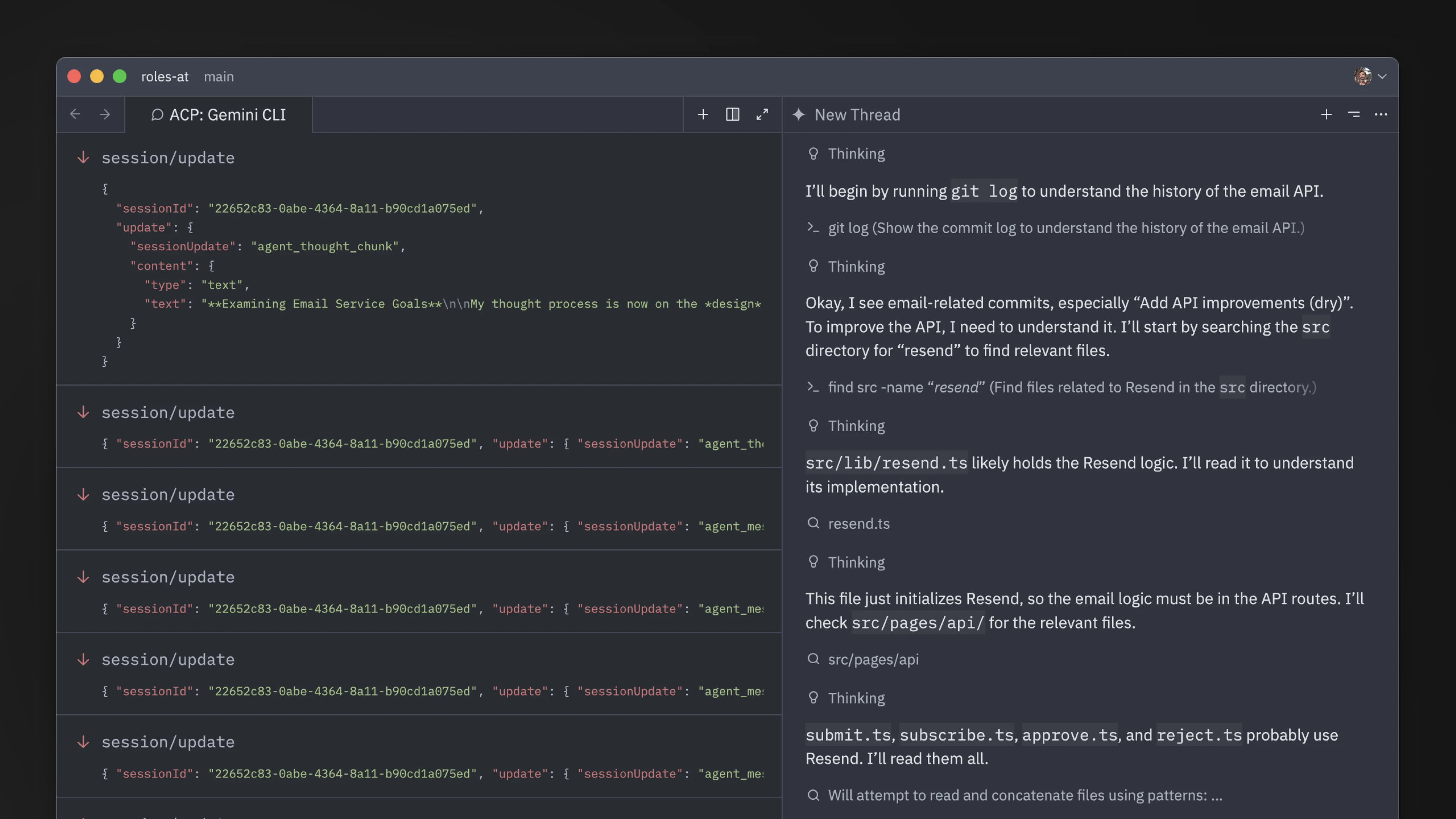
253
254It's helpful to attach data from this view if you're opening issues about problems with external agents like Claude Code, Codex, OpenCode, etc.
255
256## MCP Servers
257
258Note that for external agents, access to MCP servers [installed from Zed](./mcp.md) may vary depending on the ACP implementation.
259For example, Claude Code and Codex both support it, but Gemini CLI does not yet.