agentsh





Poke Crush—or any other CLI agent—from your shell. Inspired by zsh-kimi-cli
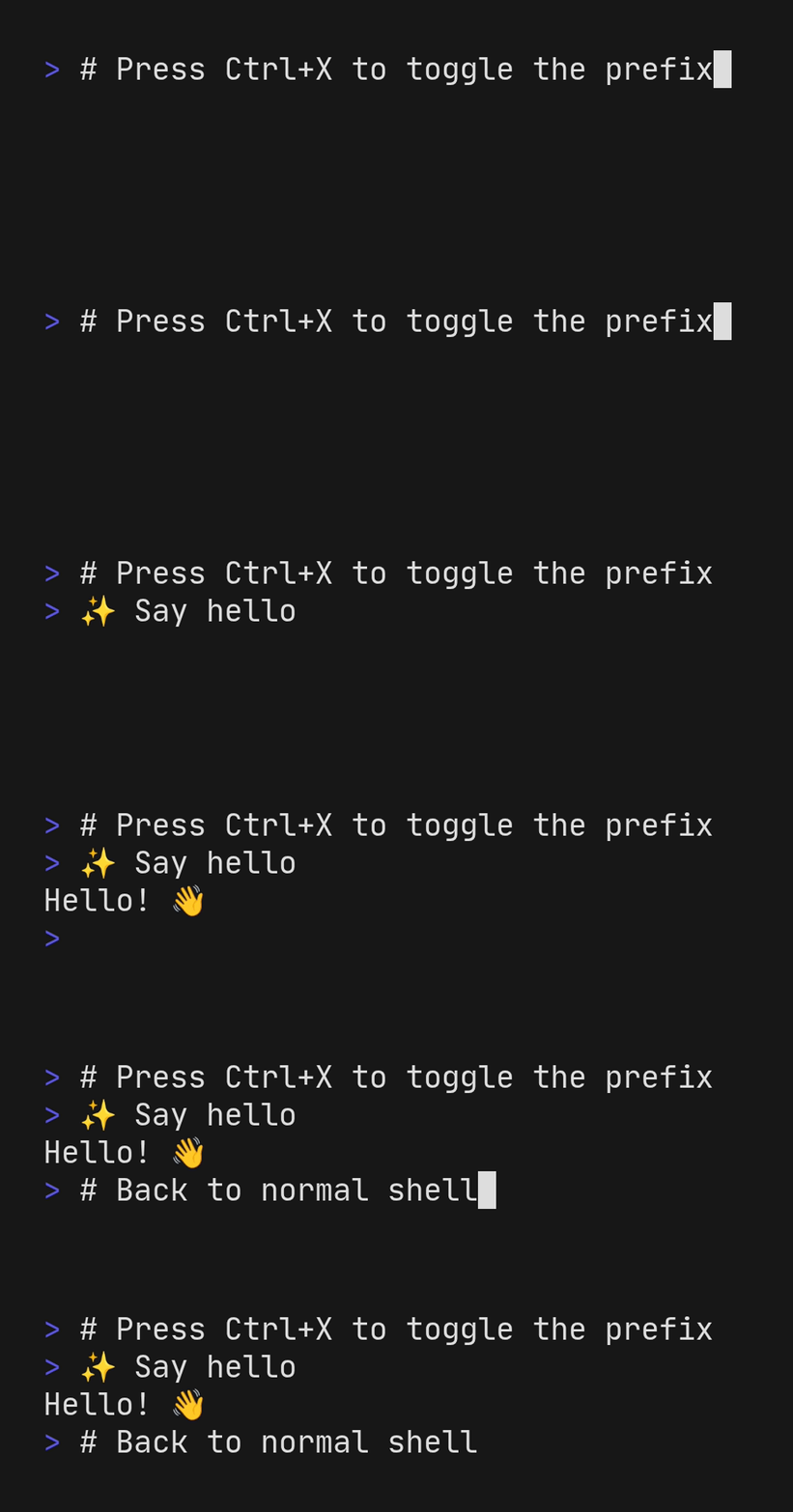
Features
- Prefix-based activation: Mark commands with
✨to send them to your agent - Quick toggle: Press
Ctrl-Xto add/remove the prefix from your current command - Customizable prefix: Configure your own prefix character and formatting
- Configurable runner: Defaults to
crush run --quiet, but you can point it at any CLI agent like Claude Code or Kimi CLI or Gemini.
Attribution
The Zsh version started as a copy of
zsh-kimi-cli by MoonshotAI with
kimi -c "prompt" swapped out for crush run --quiet "prompt". The Fish plugin
was translated and adapted from the Zsh plugin. Both have since diverged.
Requirements
- Zsh: Version 5.4 or later
- Fish: Version 3.0 or later
- Runner:
crushby default, or any executable/function referenced by__AGENTSH_RUNNER
Installation
Fish
Manual Installation
# Clone the repository
git clone https://git.secluded.site/agentsh ~/.config/fish/agentsh

# Source the plugin in your config.fish
source ~/.config/fish/agentsh/conf.d/agentsh.fish
Fundle (recommended)
Fundle works directly with git repositories (unlike Fisher), so it can pull from any host:
fundle plugin 'agentsh' --url 'https://git.secluded.site/agentsh'
fundle install
Zsh
Manual (.zshrc)
# Clone anywhere you prefer
git clone https://git.secluded.site/agentsh ~/.zsh/agentsh

# Load the plugin in .zshrc
source ~/.zsh/agentsh/agentsh.zsh
Oh My Zsh
git clone https://git.secluded.site/agentsh \
  ${ZSH_CUSTOM:-~/.oh-my-zsh/custom}/plugins/agentsh

# Add to your ~/.zshrc plugins list
plugins=(... agentsh)
Antigen
antigen bundle https://git.secluded.site/agentsh path:agentsh.zsh
antigen apply
Zinit
zinit light https://git.secluded.site/agentsh
Zplug
zplug "https://git.secluded.site/agentsh", use:agentsh.zsh
Usage
Press Ctrl-X to add the prefix before typing your message
✨ find all TODO comments in this project
✨ what is using port 8080?
Type the message, add the prefix, remove the prefix
# Type your command first
show system resource usage

# Press Ctrl-X to add the prefix
✨ show system resource usage

# Press Ctrl-X again to remove it
show system resource usage
Configuration
Custom Prefix Character
Set these variables before loading the plugin to pick your own prefix.
Fish:
set -g __AGENTSH_PREFIX_CHAR "🤖"
set -g __AGENTSH_PREFIX "$__AGENTSH_PREFIX_CHAR "
Zsh:
typeset -g __AGENTSH_PREFIX_CHAR
__AGENTSH_PREFIX_CHAR="🤖"
__AGENTSH_PREFIX="${__AGENTSH_PREFIX_CHAR} "
Custom Runner Command
Override the runner to talk to anything other than Crush. The variable is an
array/list so you can include extra flags—set it before sourcing agentsh.
Fish:
# Example overrides
set -g __AGENTSH_RUNNER claude -p
set -g __AGENTSH_RUNNER kimi -c
Zsh:
typeset -ga __AGENTSH_RUNNER
__AGENTSH_RUNNER=(claude -p)
# or
__AGENTSH_RUNNER=(kimi -c)
Prefix Protection
Both Zsh and Fish plugins prevent accidentally deleting the prefix with
backspace or Ctrl-W.
How It Works
Both plugins work by:
- Intercepting command-not-found: Commands starting with the prefix character trigger the shell's command-not-found handler
- Forwarding to your runner: The handler strips the prefix and passes the
remaining text to the configured runner (defaults to
crush run --quiet) - Preserving fallback: Non-prefixed commands continue to use the shell's normal command-not-found behavior
Differences from zsh-kimi-cli
While inspired by zsh-kimi-cli, these plugins have several notable differences:
- Defaults to Crush but can target any CLI agent via
__AGENTSH_RUNNER - Support for both Fish and Zsh shells
- Configurable prefix character and format
Contributions
Patch requests are in amolith/llm-projects on pr.pico.sh. You don't need a
new account to contribute, you don't need to fork this repo, you don't need to
fiddle with git send-email, you don't need to faff with your email client to
get git request-pull working...
You just need:
- Git
- SSH
- An SSH key
# Clone this repo, make your changes, and commit them
# Create a new patch request with
git format-patch origin/main --stdout | ssh pr.pico.sh pr create amolith/llm-projects
# After potential feedback, submit a revision to an existing patch request with
git format-patch origin/main --stdout | ssh pr.pico.sh pr add {prID}
# List patch requests
ssh pr.pico.sh pr ls amolith/llm-projects
See "How do Patch Requests work?" on pr.pico.sh's home page for a more complete example workflow.
Some other tools if this one interested you
- git-format - CLI that turns LLM input into well-formatted conventional commits and tags
- lune - CLI and MCP server for Lunatask integration