synu
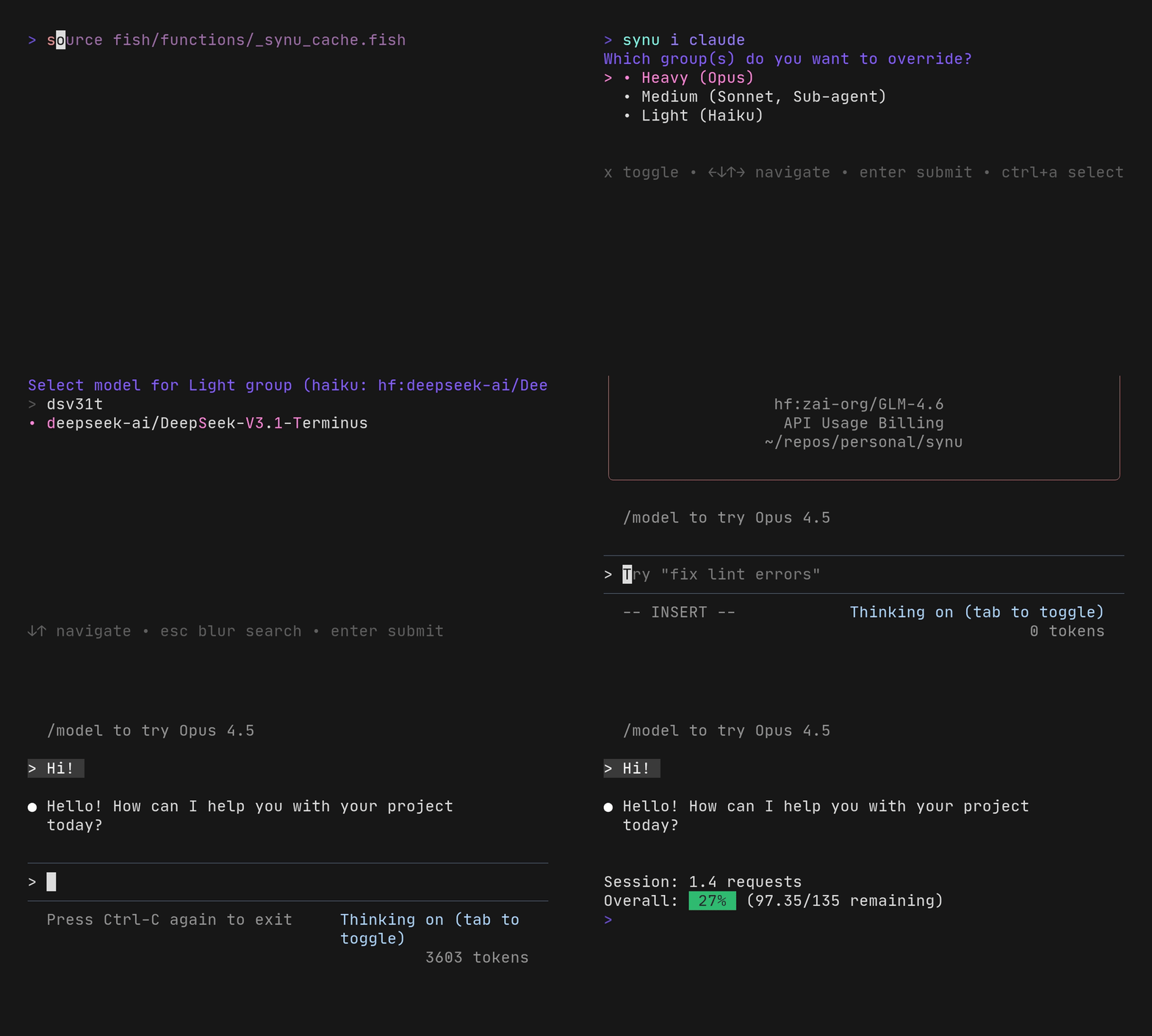
Universal wrapper for LLM agents that tracks Synthetic usage and interactively preconfigures supported agents for currently-available models (so you can try a new one as soon as they support it, without waiting for the agent itself to gain support!)
Contents
- Requirements
- Installation
- Configuration
- Usage
- Configured Agents
- How it works
- Shell completions
- Contributions
Requirements
- Fish or Zsh
curl- for API requestsjq- for JSON parsinggum- for interactive model selection (install)SYNTHETIC_API_KEYenvironment variable (for quota tracking with Synthetic)
Installation
Fish
Add to your ~/.config/fish/config.fish:
fundle plugin 'synu' --url 'https://git.secluded.site/synu' --path 'fish'
fundle init
Then reload your shell and run fundle install.
Zsh
Using zinit:
zinit ice from"git.secluded.site" pick"zsh/synu.plugin.zsh"
zinit load synu
Using antigen:
antigen bundle https://git.secluded.site/synu.git zsh --branch=main
Using sheldon (in ~/.config/sheldon/plugins.toml):
[plugins.synu]
git = "https://git.secluded.site/synu"
use = ["zsh/synu.plugin.zsh"]
Or source manually:
source /path/to/synu/zsh/synu.plugin.zsh
Configuration
Set your Synthetic API key in your shell configuration:
# Fish: ~/.config/fish/config.fish
set -gx SYNTHETIC_API_KEY your_api_key_here
# Zsh: ~/.zshrc
export SYNTHETIC_API_KEY=your_api_key_here
Usage
Use synu as a wrapper for any AI agent:
# Check current quota
synu

# Start an agent's interactive TUI (most common usage)
synu claude
synu opencode
synu aider

# Non-interactive / one-shot mode (agent-specific flags)
synu claude -p "What does functions/synu.fish do?"
synu opencode run "Help me refactor this"
synu aider -m "Fix the bug in main.go"  # aider's -m is --message
synu llxprt "prompt"                     # positional works
synu qwen "prompt"                       # positional works (one-shot by default)

# Passthrough agents (quota tracking only)
synu crush run "Help me write code"

# Any other agent or command
synu [agent-name] [agent-args...]
Note: synu's configuration is ephemeral and non-invasive. Running
synu clauderoutes requests through Synthetic, but runningclaudedirectly still uses Anthropic's API with your normal configuration. synu never modifies the agent's own config files.
Interactive Model Selection
Use synu i <agent> to fetch the list of available models and
interactively filter/select them using gum:
# Select models interactively, then start agent TUI
synu i claude
synu i opencode
synu i aider

# Additional agent args are passed through after model selection
synu i claude -p "Non-interactive with selected model"
You'll be asked whether to save your selection as the default for future sessions.
Persistent Preferences
Model selections made in interactive mode can be saved to
~/.config/synu/models.conf. These become the new defaults until
changed. Command-line flags always override saved preferences.
Configured Agents
Claude Code
Website, install with curl -fsSL https://claude.ai/install.sh | bash
| Slot | Default |
|---|---|
| Opus | hf:moonshotai/Kimi-K2-Thinking |
| Sonnet | hf:zai-org/GLM-4.6 |
| Haiku | hf:deepseek-ai/DeepSeek-V3.1-Terminus |
| Subagent | hf:zai-org/GLM-4.6 |
Override flags:
# Override specific models (opens TUI)
synu claude --opus hf:other/model
synu claude --sonnet hf:other/model
synu claude --haiku hf:other/model
synu claude --agent hf:other/model

# Group overrides
synu claude --heavy hf:model    # Sets Opus
synu claude --medium hf:model   # Sets Sonnet and Subagent
synu claude --light hf:model    # Sets Haiku

# Non-interactive with model override
synu claude --heavy hf:model -p "What does this code do?"
OpenCode
Website, install with bun i -g opencode-ai
| Slot | Default |
|---|---|
| Model | hf:zai-org/GLM-4.6 |
# TUI mode with model override
synu opencode --model hf:other/model

# Non-interactive
synu opencode --model hf:other/model run "Help me refactor this"
Aider
Website, install with uv tool install --force --python python3.12 --with pip aider-chat@latest
| Slot | Default |
|---|---|
| Main | hf:zai-org/GLM-4.6 |
| Editor | hf:deepseek-ai/DeepSeek-V3.1-Terminus |
# Chat mode with model override
synu aider --model hf:some/model

# Non-interactive (one-shot message)
synu aider --model hf:some/model -m "Fix the bug in main.go"

# Architect + editor mode
synu aider --model hf:architect/model --editor-model hf:editor/model
Note: synu uses
--model(long form only) for aider to avoid collision with aider's-m(--message) flag.
llxprt
Repo, install with bun i -g @vybestack/llxprt-code
| Slot | Default |
|---|---|
| Model | hf:zai-org/GLM-4.6 |
Note: llxprt doesn't support setting credentials via environment variables. Run
/key {your_api_key}once at the llxprt prompt to configure.
# TUI mode with model override
synu llxprt --model hf:other/model

# Non-interactive (positional prompt)
synu llxprt --model hf:other/model "Explain this code"
Qwen Code
Repo, install with bun i -g @qwen-code/qwen-code@latest
| Slot | Default |
|---|---|
| Model | hf:zai-org/GLM-4.6 |
# One-shot mode with model override (positional prompt)
synu qwen --model hf:other/model "Explain this code"

# Interactive mode
synu qwen --model hf:other/model -i "Start from this prompt"
How it works
synu works by:
- Loading agent-specific configuration if available
- Fetching initial quota from the Synthetic API before running the agent
- Configuring the agent's environment/CLI args to route through Synthetic
- Executing the specified agent with all provided arguments
- Cleaning up environment variables after execution
- Fetching final quota and displaying session usage
The quota tracking requires the SYNTHETIC_API_KEY environment
variable. Without it, synu will show a warning and skip quota
tracking, but still attempt to run the agent.
Shell completions
Synu includes completions for configured agents and their flags in both Fish and Zsh.
Contributions
Patch requests are in amolith/llm-projects on pr.pico.sh. You don't need a
new account to contribute, you don't need to fork this repo, you don't need to
fiddle with git send-email, you don't need to faff with your email client to
get git request-pull working...
You just need:
- Git
- SSH
- An SSH key
# Clone this repo, make your changes, and commit them
# Create a new patch request with
git format-patch origin/main --stdout | ssh pr.pico.sh pr create amolith/llm-projects
# After potential feedback, submit a revision to an existing patch request with
git format-patch origin/main --stdout | ssh pr.pico.sh pr add {prID}
# List patch requests
ssh pr.pico.sh pr ls amolith/llm-projects
See "How do Patch Requests work?" on pr.pico.sh's home page for a more complete example workflow.