1<!--
2SPDX-FileCopyrightText: Amolith <amolith@secluded.site>
3
4SPDX-License-Identifier: Unlicense
5-->
6
7# synu
8
9Universal wrapper for LLM agents that tracks
10[Synthetic](https://synthetic.new) usage and interactively preconfigures
11supported agents for currently-available models (so you can try a new
12one as soon as they support it, without waiting for the agent itself to
13gain support!)
14
15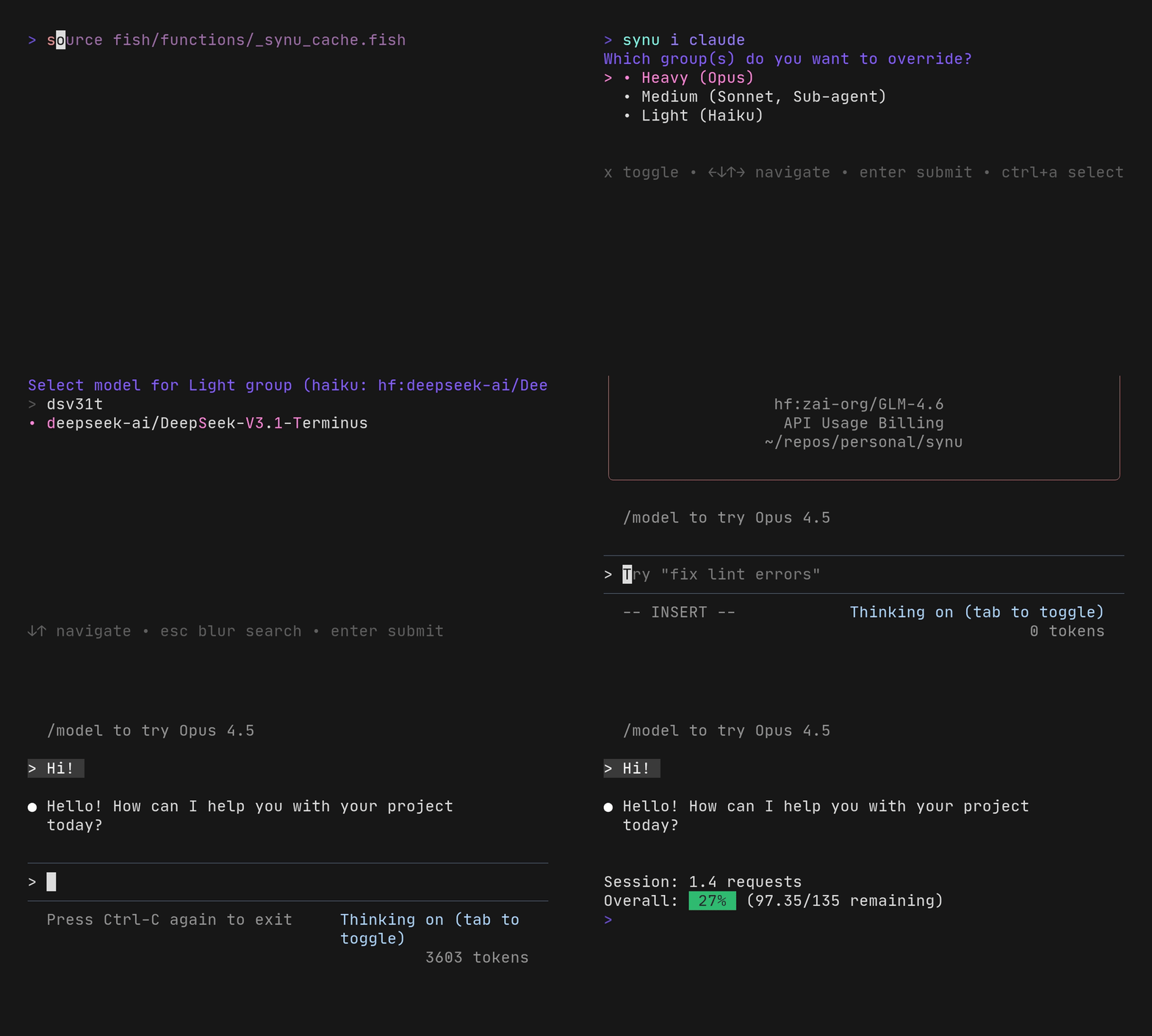
27
28## Contents
29
30- [Requirements](#requirements)
31- [Installation](#installation)
32 - [Fish](#fish)
33 - [Zsh](#zsh)
34- [Configuration](#configuration)
35- [Usage](#usage)
36 - [Interactive Model Selection](#interactive-model-selection)
37 - [Persistent Preferences](#persistent-preferences)
38- [Configured Agents](#configured-agents)
39 - [Claude Code](#claude-code)
40 - [OpenCode](#opencode)
41 - [Aider](#aider)
42 - [llxprt](#llxprt)
43 - [Qwen Code](#qwen-code)
44- [How it works](#how-it-works)
45- [Shell completions](#shell-completions)
46- [Contributions](#contributions)
47
48## Requirements
49
50- Fish **or** Zsh
51- `curl` - for API requests
52- `jq` - for JSON parsing
53- `gum` - for interactive model selection
54 ([install](https://github.com/charmbracelet/gum))
55- `SYNTHETIC_API_KEY` environment variable (for quota tracking with
56 Synthetic)
57
58## Installation
59
60### Fish
61
62Add to your `~/.config/fish/config.fish`:
63
64```fish
65fundle plugin 'synu' --url 'https://git.secluded.site/synu' --path 'fish'
66fundle init
67```
68
69Then reload your shell and run `fundle install`.
70
71### Zsh
72
73Using [zinit](https://github.com/zdharma-continuum/zinit):
74
75```zsh
76zinit ice from"git.secluded.site" pick"zsh/synu.plugin.zsh"
77zinit load synu
78```
79
80Using [antigen](https://github.com/zsh-users/antigen):
81
82```zsh
83antigen bundle https://git.secluded.site/synu.git zsh --branch=main
84```
85
86Using [sheldon](https://sheldon.cli.rs/) (in `~/.config/sheldon/plugins.toml`):
87
88```toml
89[plugins.synu]
90git = "https://git.secluded.site/synu"
91use = ["zsh/synu.plugin.zsh"]
92```
93
94Or source manually:
95
96```zsh
97source /path/to/synu/zsh/synu.plugin.zsh
98```
99
100## Configuration
101
102Set your Synthetic API key in your shell configuration:
103
104```fish
105# Fish: ~/.config/fish/config.fish
106set -gx SYNTHETIC_API_KEY your_api_key_here
107```
108
109```zsh
110# Zsh: ~/.zshrc
111export SYNTHETIC_API_KEY=your_api_key_here
112```
113
114## Usage
115
116Use `synu` as a wrapper for any AI agent:
117
118```fish
119# Check current quota
120synu
121
122# Start an agent's interactive TUI (most common usage)
123synu claude
124synu opencode
125synu aider
126
127# Non-interactive / one-shot mode (agent-specific flags)
128synu claude -p "What does functions/synu.fish do?"
129synu opencode run "Help me refactor this"
130synu aider -m "Fix the bug in main.go" # aider's -m is --message
131synu llxprt "prompt" # positional works
132synu qwen "prompt" # positional works (one-shot by default)
133
134# Passthrough agents (quota tracking only)
135synu crush run "Help me write code"
136
137# Any other agent or command
138synu [agent-name] [agent-args...]
139```
140
141> **Note**: synu's configuration is ephemeral and non-invasive. Running
142> `synu claude` routes requests through Synthetic, but running `claude`
143> directly still uses Anthropic's API with your normal configuration.
144> synu never modifies the agent's own config files.
145
146### Interactive Model Selection
147
148Use `synu i <agent>` to fetch the list of available models and
149interactively filter/select them using gum:
150
151```fish
152# Select models interactively, then start agent TUI
153synu i claude
154synu i opencode
155synu i aider
156
157# Additional agent args are passed through after model selection
158synu i claude -p "Non-interactive with selected model"
159```
160
161You'll be asked whether to save your selection as the default for future
162sessions.
163
164### Persistent Preferences
165
166Model selections made in interactive mode can be saved to
167`~/.config/synu/models.conf`. These become the new defaults until
168changed. Command-line flags always override saved preferences.
169
170## Configured Agents
171
172### Claude Code
173
174[Website](https://www.claude.com/product/claude-code), install with `curl -fsSL https://claude.ai/install.sh | bash`
175
176| Slot | Default |
177| -------- | --------------------------------------- |
178| Opus | `hf:moonshotai/Kimi-K2-Thinking` |
179| Sonnet | `hf:zai-org/GLM-4.6` |
180| Haiku | `hf:deepseek-ai/DeepSeek-V3.1-Terminus` |
181| Subagent | `hf:zai-org/GLM-4.6` |
182
183**Override flags:**
184
185```fish
186# Override specific models (opens TUI)
187synu claude --opus hf:other/model
188synu claude --sonnet hf:other/model
189synu claude --haiku hf:other/model
190synu claude --agent hf:other/model
191
192# Group overrides
193synu claude --heavy hf:model # Sets Opus
194synu claude --medium hf:model # Sets Sonnet and Subagent
195synu claude --light hf:model # Sets Haiku
196
197# Non-interactive with model override
198synu claude --heavy hf:model -p "What does this code do?"
199```
200
201### OpenCode
202
203[Website](https://opencode.ai/), install with `bun i -g opencode-ai`
204
205| Slot | Default |
206| ----- | -------------------- |
207| Model | `hf:zai-org/GLM-4.6` |
208
209```fish
210# TUI mode with model override
211synu opencode --model hf:other/model
212
213# Non-interactive
214synu opencode --model hf:other/model run "Help me refactor this"
215```
216
217### Aider
218
219[Website](https://aider.chat/), install with `uv tool install --force --python python3.12 --with pip aider-chat@latest`
220
221| Slot | Default |
222| ------ | --------------------------------------- |
223| Main | `hf:zai-org/GLM-4.6` |
224| Editor | `hf:deepseek-ai/DeepSeek-V3.1-Terminus` |
225
226```fish
227# Chat mode with model override
228synu aider --model hf:some/model
229
230# Non-interactive (one-shot message)
231synu aider --model hf:some/model -m "Fix the bug in main.go"
232
233# Architect + editor mode
234synu aider --model hf:architect/model --editor-model hf:editor/model
235```
236
237> **Note**: synu uses `--model` (long form only) for aider to avoid
238> collision with aider's `-m` (`--message`) flag.
239
240### llxprt
241
242[Repo](https://github.com/vybestack/llxprt-code), install with `bun i -g @vybestack/llxprt-code`
243
244| Slot | Default |
245| ----- | -------------------- |
246| Model | `hf:zai-org/GLM-4.6` |
247
248> **Note**: llxprt doesn't support setting credentials via environment
249> variables. Run `/key {your_api_key}` once at the llxprt prompt to configure.
250
251```fish
252# TUI mode with model override
253synu llxprt --model hf:other/model
254
255# Non-interactive (positional prompt)
256synu llxprt --model hf:other/model "Explain this code"
257```
258
259### Qwen Code
260
261[Repo](https://github.com/QwenLM/qwen-code), install with `bun i -g @qwen-code/qwen-code@latest`
262
263| Slot | Default |
264| ----- | -------------------- |
265| Model | `hf:zai-org/GLM-4.6` |
266
267```fish
268# One-shot mode with model override (positional prompt)
269synu qwen --model hf:other/model "Explain this code"
270
271# Interactive mode
272synu qwen --model hf:other/model -i "Start from this prompt"
273```
274
275## How it works
276
277`synu` works by:
278
2791. Loading agent-specific configuration if available
2802. Fetching initial quota from the Synthetic API before running the
281 agent
2823. Configuring the agent's environment/CLI args to route through
283 Synthetic
2844. Executing the specified agent with all provided arguments
2855. Cleaning up environment variables after execution
2866. Fetching final quota and displaying session usage
287
288The quota tracking requires the `SYNTHETIC_API_KEY` environment
289variable. Without it, `synu` will show a warning and skip quota
290tracking, but still attempt to run the agent.
291
292## Shell completions
293
294Synu includes completions for configured agents and their flags in both
295Fish and Zsh.
296
297## Contributions
298
299Patch requests are in [amolith/llm-projects] on [pr.pico.sh]. You don't need a
300new account to contribute, you don't need to fork this repo, you don't need to
301fiddle with `git send-email`, you don't need to faff with your email client to
302get `git request-pull` working...
303
304You just need:
305
306- Git
307- SSH
308- An SSH key
309
310```sh
311# Clone this repo, make your changes, and commit them
312# Create a new patch request with
313git format-patch origin/main --stdout | ssh pr.pico.sh pr create amolith/llm-projects
314# After potential feedback, submit a revision to an existing patch request with
315git format-patch origin/main --stdout | ssh pr.pico.sh pr add {prID}
316# List patch requests
317ssh pr.pico.sh pr ls amolith/llm-projects
318```
319
320See "How do Patch Requests work?" on [pr.pico.sh]'s home page for a more
321complete example workflow.
322
323[amolith/llm-projects]: https://pr.pico.sh/r/amolith/llm-projects
324[pr.pico.sh]: https://pr.pico.sh